The LogProduct
AI Assistant Integration: A Practical Guide for Tech Teams
Discover effective AI assistant integration techniques. Learn to set up middleware, identify endpoints, and ensure smooth deployment for tech teams.

The most reliable way to integrate an AI assistant is to treat it as an authenticated agent and connect it to your stack through a typed middleware layer — an MCP or connective layer — that handles tool schemas, auth, and audit in one place. Here is where to start:
- Identify your critical endpoints and data. Map the APIs, databases, and services the assistant needs to read from or act on. Tag data sensitivity before you write a single line of connector code.
- Choose your integration pattern. Direct function-calling works for a single model and a handful of endpoints. A middleware or MCP layer is the right call for anything you plan to scale or swap models on later.
- Set minimal governance from day one. Assign the agent a unique identity, scope its permissions to the minimum required, and turn on audit logging before the first pilot user touches it.
A focused first pilot — one use case, one team, four to six weeks — is realistic and gives you enough signal to decide whether to scale.
Table of Contents
- What is an AI assistant, and how does it differ from a chatbot or agent?
- Which architecture pattern should you use for your integration?
- How to build your integration: a step-by-step checklist
- Security, governance, and compliance: the controls you cannot skip
- How to test your assistant and know when it is working
- A practical integration walkthrough, step by step
- The pitfalls that will slow you down (and how to avoid them)
- Data privacy and compliance in AI assistant integrations
- Scaling and performance optimization for production AI assistants
- Error handling and fallback mechanisms in AI assistant workflows
- UX design principles for AI assistant interactions
- Key Takeaways
- Why governance-first integrations are the ones that actually survive
- Nausika brings validated maritime data to your AI assistant
- Authoritative sources and further reading
What is an AI assistant, and how does it differ from a chatbot or agent?
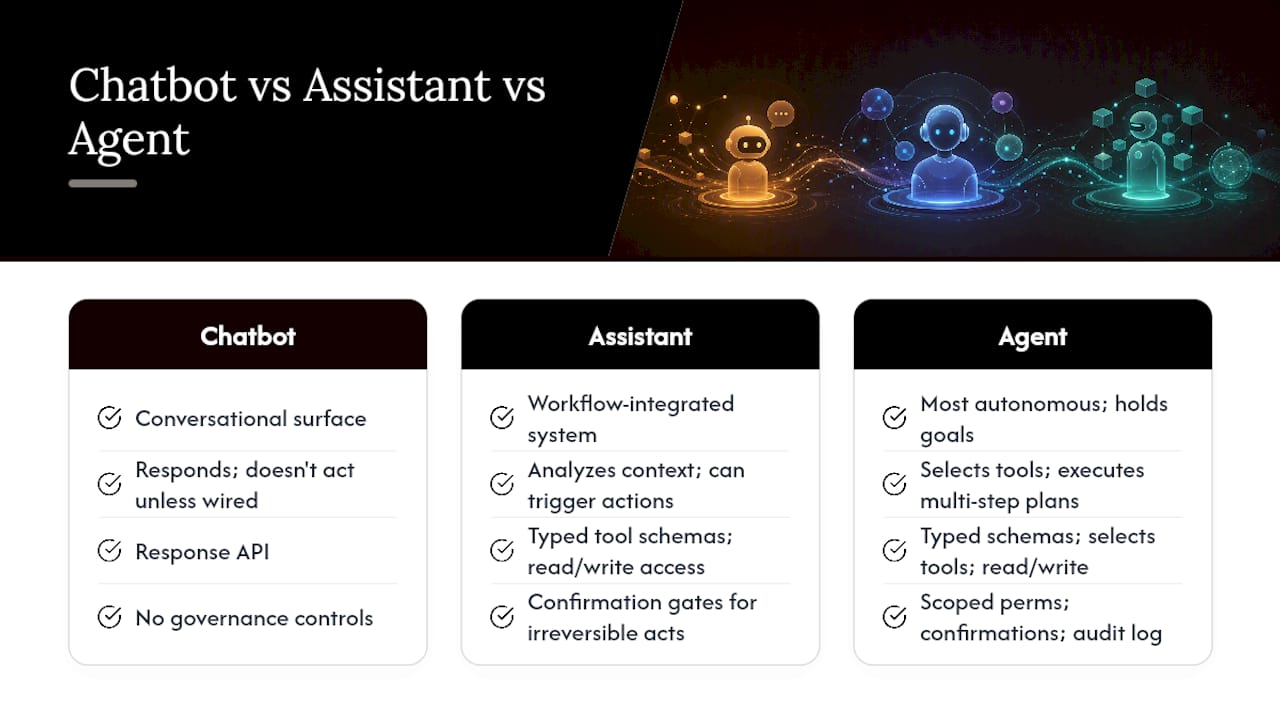
The terms get used interchangeably, but the differences matter for how you design an integration. AI assistants are workflow-integrated systems that analyze context and deliver outputs that can trigger real actions. A chatbot is a conversational surface: it responds, but it does not act on external systems unless explicitly wired to do so. An agent is the most autonomous of the three — it holds a goal, selects tools, executes multi-step plans, and loops until the task is done or it hits a constraint.
The integration requirement changes sharply as you move from chatbot to assistant to agent. A chatbot needs a response API. An assistant needs typed tool schemas and read/write access to your systems. An agent needs all of that plus governance controls — scoped permissions, confirmation gates, and audit trails — because it can take irreversible actions without a human in the loop.
Two scenarios make this concrete. A read-only summarization assistant pulls a support ticket from your CRM, summarizes it, and surfaces it to an agent. The integration is a single authenticated GET call with a typed schema. Now consider an assistant that closes the ticket, reassigns it, and sends a follow-up email. That requires write permissions, a confirmation gate before the irreversible send, and a full audit log of every action taken. The architecture for the second scenario is meaningfully different from the first.
Function-calling is the mechanism most LLMs use to invoke tools. The model receives a list of available tools with typed schemas — name, description, input parameters, output shape — and decides which one to call based on user intent. Getting those schemas right is where most integrations stumble.
Which architecture pattern should you use for your integration?
Three patterns cover most production scenarios. The right choice depends on how many models you plan to support, how many connectors you need, and how much governance overhead you can absorb.
Direct function-calling
The LLM receives a list of tool schemas and calls them directly against your APIs. Fast to prototype, but every model has a slightly different function-calling format. When you swap models, you rewrite connectors. Home Assistant’s LLM API shows this pattern clearly: integrations register tools via an async_get_tools hook, and the model calls them by name with typed parameters.
Adapter-per-model
You build a thin adapter for each model that translates its native function-calling format into your internal API contract. Reduces some duplication, but the maintenance burden grows linearly with the number of models you support. Not recommended for teams planning to evaluate multiple LLMs.
Middleware or MCP layer (recommended for production)
A connective middleware layer sits between the LLM and your connectors. It handles tool discovery, typed schema resolution, OAuth flows, and audit logging in one place. Prizm is one example of a managed MCP layer: it exposes connectors as MCP servers, provides typed tool schemas, manages short-lived OAuth links, and supports multi-execute calls for multi-step workflows. Merge takes a similar approach, offering a single API surface that connects to many downstream integrations and reduces the per-connector engineering effort significantly.
The production architecture looks like this:
Client UI → AI Assistant (LLM) → MCP / Middleware Layer → Connectors → Services / Data StoresThe middleware layer is where auth tokens are exchanged, tool schemas are served, and every action is logged. The LLM never touches credentials directly.
MCP standardizes tool discovery and execution, but it does not solve security on its own. Scoped permissions, confirmation gates, and audit retention policies must be implemented at the connection layer, around MCP, not inside it.
| Pattern | Dev Speed | Maintenance | Model Portability | Security Surface |
|---|---|---|---|---|
| Direct function-calling | Fast | High per model | Low | Wide |
| Adapter-per-model | Medium | Medium | Medium | Medium |
| MCP / Middleware layer | Slower start | Low (centralized) | High | Narrow (centralized auth) |
Zapier’s platform and Integrate.dev both offer prebuilt connector catalogs and MCP gateway options that can cut the “slower start” of the middleware approach considerably — worth evaluating before you build custom connectors from scratch.
How to build your integration: a step-by-step checklist
Phase 3: Build and pilot (weeks 3–6)
- Build connectors against your schemas — Use prebuilt SDKs from platforms like Integrate.dev where available — they provide ready connectors that reduce custom wiring.
Security, governance, and compliance: the controls you cannot skip
Treat every AI assistant as an authenticated, auditable principal — not a trusted internal service. That framing changes how you design permissions, logging, and human oversight.
The single most common governance failure in early AI assistant deployments is over-permissive agent credentials. An assistant that can read and write across your entire CRM “because it’s easier” is a misconfigured assistant. Scope permissions to the minimum the use case requires, and audit every action.
Authentication
Use OAuth 2.0 with PKCE for all connector auth flows. Short-lived tokens reduce the blast radius of a credential leak. Managed credential stores — not environment variables or hardcoded secrets — are the baseline. Zapier’s governance controls include endpoint-level restrictions and managed connections that enforce this pattern at the platform level.
Audit logging
Log every tool call: agent identity, tool name, input parameters, output, timestamp, and success/failure status. Retain logs for at least 90 days, longer for regulated industries. Endpoint-level granularity matters — knowing “the assistant called the CRM” is not enough; you need to know which record it touched and what it changed.
Confirmation gates
For any action that is irreversible — sending an email, deleting a record, executing a financial transaction — require explicit human confirmation before execution. This is non-negotiable for safety-critical domains. In maritime navigation, for example, a routing instruction that sends a vessel toward a hazard cannot be undone by a rollback.
Role-based workspaces and policy hooks
Segment agent access by role. A customer support assistant should not have access to financial records. Policy hooks let you enforce these boundaries at the middleware layer rather than relying on individual connector configurations.
Pro Tip: Build a “dry run” mode into every connector from the start. It lets the assistant describe what it would do without actually doing it — invaluable for testing and for building user trust before you enable write access.
Governance also intersects with compliance. Data minimization — passing only the fields the tool actually needs, not full record objects — reduces your exposure under frameworks like HIPAA, SOC 2, and state-level privacy laws. Scoped access tokens enforce this at the API layer.
How to test your assistant and know when it is working
Testing an AI assistant is different from testing a deterministic API. The model’s outputs are probabilistic, so your test suite needs to cover both the connector layer (deterministic) and the assistant’s behavior (probabilistic).
A practical integration walkthrough, step by step
The checklist in the implementation section covers the phases. This section focuses on the decisions that trip teams up at each transition.
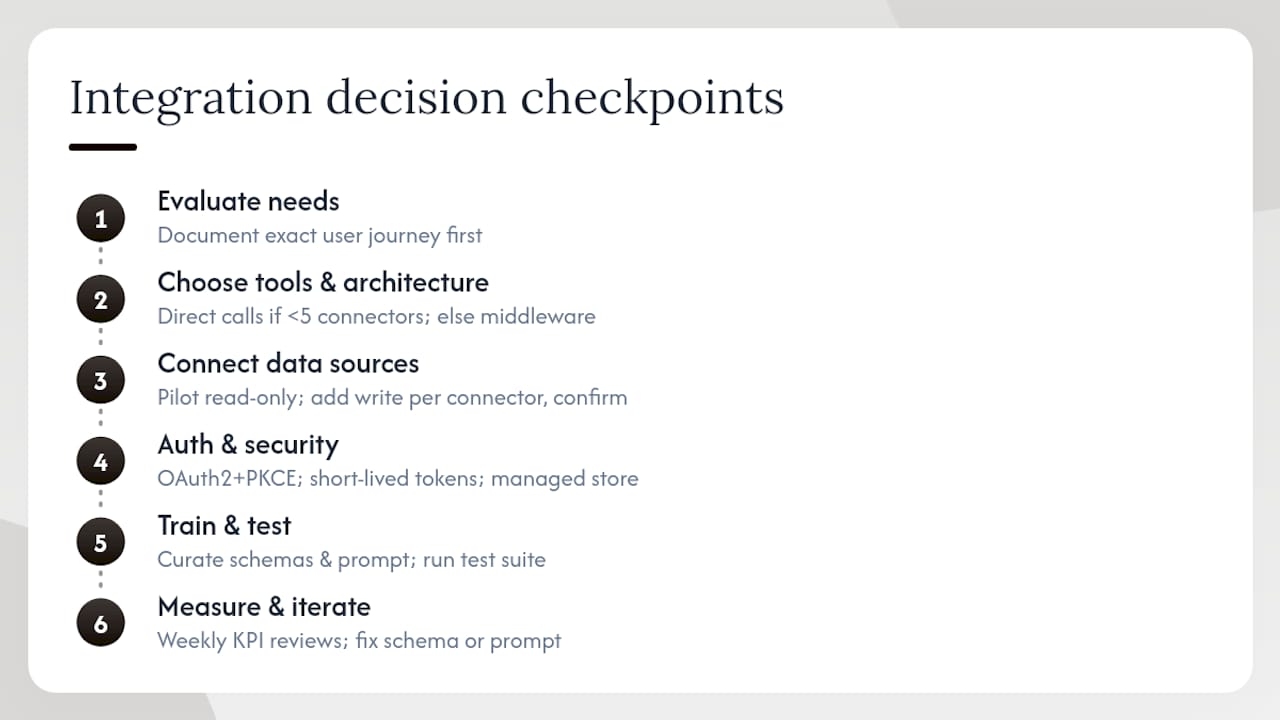
Evaluate needs. The most common mistake here is starting with the technology instead of the workflow. Before you choose a model or a middleware platform, write out the exact user journey in plain language. Who is the user? What do they ask? What does the assistant need to retrieve or change? What happens if it gets it wrong?
Choose tools and architecture. If you have one model and fewer than five connectors, direct function-calling is fine for a pilot. If you are evaluating multiple models or expect the connector count to grow, start with a middleware layer. Retrofitting governance onto a direct function-calling architecture is painful.
Connect data sources. Prefer read-only access during the pilot. Add write access one connector at a time, with a confirmation gate on each new write operation. Use the Home Assistant LLM API pattern as a reference for how to register tools cleanly — the async_get_tools hook pattern translates well to other frameworks.
Auth and security. OAuth 2.0 + PKCE, short-lived tokens, managed credential stores. No exceptions.
Train and test. “Training” for most assistant integrations means curating the tool schemas and the system prompt — not fine-tuning the model. Get the schemas right first. Then run the test suite described in the testing section before any user touches the pilot.
Measure and iterate. Review your KPIs weekly during the pilot. Human override frequency is the leading indicator: if it is high, the assistant is making wrong tool selections or producing outputs users do not trust. Fix the schema or the prompt before expanding access.
The pitfalls that will slow you down (and how to avoid them)
Building bespoke per-model connectors. This is the most expensive mistake teams make. Each major LLM provider has a slightly different function-calling format. If you wire your connectors directly to GPT-4o’s format, you will rewrite them when you evaluate Claude or Gemini. A connective abstraction layer — the middleware pattern — insulates your connectors from model-specific formats. Merge exists precisely to solve this: one API surface, many downstream integrations, model-agnostic.
Over-permissive agent privileges. An assistant that can do everything is an assistant that can break everything. Scope permissions to the minimum the use case requires. Review and tighten them after the pilot, not before.
Skipping typed schemas. Vague tool descriptions produce vague tool calls. If your schema says “search the database,” the model will invent parameters. If it says “search tickets by status (open|closed|pending) and assignee (string, optional),” the model calls it correctly. Typed schemas are not optional — they are the contract between the model and your system.
Treating hallucination as a prompt problem. For factual, real-time, or safety-critical data, prompt engineering alone cannot prevent hallucination. The fix is a validated data connector that returns structured, sourced results — not a longer system prompt.
Ignoring the rollback plan. Every pilot needs a documented procedure for disabling the assistant’s access to any connector within minutes. Write it before you go live.
Data privacy and compliance in AI assistant integrations
Privacy considerations in AI assistant integration are not an afterthought — they shape your architecture from the first design decision. The core principle is data minimization: the assistant should receive only the data it needs to complete the specific task, not a full record dump.
In practice, this means scoping tool schemas to return specific fields rather than full objects. A tool that returns {ticket_id, status, assignee} is safer than one that returns the entire ticket record including customer PII. The model sees less sensitive data, and your exposure under CCPA, HIPAA, or SOC 2 is correspondingly smaller.
For regulated industries, confirm that your middleware layer and connectors support data residency requirements. If customer data cannot leave a specific region, your connector architecture must enforce that at the API layer — not just in policy documents.
Audit logs themselves can contain sensitive data. Treat them as regulated data: encrypt at rest, restrict access, and define retention periods before you go live. Ninety days is a common baseline; regulated industries often require longer.
Finally, if your assistant uses a third-party LLM API, review the provider’s data processing agreement. Most major providers offer enterprise agreements that exclude training on customer data, but the default terms may not. Confirm before you send any production data to the model.
Scaling and performance optimization for production AI assistants
A pilot with twenty users and a production deployment with two thousand users are different engineering problems. Plan for scale before you need it.
Connector latency is the bottleneck. LLM inference is fast. Connector round-trips are where latency accumulates. Cache read-only connector responses aggressively — maritime forecast data, for example, does not change by the second. Set cache TTLs that match the data’s actual freshness requirements.
Token budget management. Every tool schema, system prompt, and conversation history consumes tokens. As conversation length grows, costs grow with it. Implement context window management: summarize older turns, trim irrelevant tool call history, and set hard limits on context length per session.
Horizontal scaling of the middleware layer. The MCP or connective layer should be stateless so it scales horizontally. Store session state and token caches in a shared store (Redis is common) rather than in process memory.
Model routing by task type. Not every request needs the most capable (and most expensive) model. Route simple classification tasks to a smaller, faster model and reserve the large model for complex reasoning. This can cut inference costs substantially without degrading user experience for routine tasks.
Rate limiting and backpressure. Set per-user and per-team rate limits at the middleware layer. When a connector is slow or unavailable, implement backpressure so the assistant degrades gracefully rather than queuing requests until it times out.
Error handling and fallback mechanisms in AI assistant workflows
Errors in AI assistant workflows come from three places: the model (wrong tool selection, malformed call), the connector (API failure, auth expiry), and the data (unexpected schema, missing field). Each needs a different response.
Model errors. When the model selects the wrong tool or generates a malformed call, the middleware layer should return a structured error that the model can reason over — not a raw stack trace. A well-formed error response lets the model retry with a corrected call or ask the user for clarification.
Connector failures. Treat connector failures like any distributed system failure: retry with exponential backoff for transient errors, circuit-break for persistent failures, and surface a clear user-facing message when the connector is unavailable. Never let a connector failure produce a hallucinated response — if the data is not available, say so.
Fallback to human. For any task where the assistant cannot complete the action with confidence — low intent-match score, missing required parameters, connector unavailable — route to a human rather than guessing. This is especially important in customer-facing deployments where a wrong action damages trust.
Graceful degradation. Design the assistant to be useful even when some connectors are offline. A maritime assistant that cannot reach the forecast connector should tell the user clearly, not invent a forecast.
UX design principles for AI assistant interactions
The technical architecture is only half the problem. How the assistant communicates with users determines whether they trust it and keep using it.
Be explicit about what the assistant can and cannot do. Users who understand the assistant’s scope set appropriate expectations. An onboarding flow that shows two or three example queries is more effective than a blank text box.
Show your work. When the assistant takes an action, confirm it in plain language: “I’ve routed ticket #4821 to the infrastructure team.” Users who can see what the assistant did are more likely to catch errors and more likely to trust correct outputs.
Confirmation before irreversible actions. This is a UX principle as much as a governance one. “I’m about to send this email to the customer. Confirm?” gives the user agency and prevents costly mistakes.
Fail with specificity. “I couldn’t complete that” is not a useful error message. “I couldn’t find an anchorage matching your draft requirement in that area — try expanding the search radius or adjusting the depth filter” is. Specific failure messages help users self-correct.
Avoid over-automation. The assistant should handle the repetitive, low-stakes parts of a workflow and surface the high-stakes decisions to the human. Users who feel the assistant is making decisions they should be making will stop using it.
Key Takeaways
Effective AI assistant integration requires treating the assistant as an authenticated agent from day one, with typed schemas, scoped permissions, and audit logging in place before the first pilot user.
| Point | Details |
|---|---|
| Choose middleware for scale | A typed MCP or connective layer keeps connectors model-agnostic and centralizes auth and audit. |
| Governance before go-live | Scoped permissions, confirmation gates, and audit logs must be in place before any write access is enabled. |
| Typed schemas prevent hallucination | Full, typed tool schemas are the contract between the model and your system — vague schemas produce wrong calls. |
| Pilot small, measure fast | A four-to-six-week pilot with 10–20 users gives enough signal to validate the architecture before scaling. |
| Nausika for maritime data | Nausika connects validated maritime routing, forecasts, and harbor data to AI assistants via typed APIs, replacing hallucinated navigation responses with sourced, structured results. |
Why governance-first integrations are the ones that actually survive
The teams that struggle most with AI assistant integration are usually the ones that treated governance as a phase-two problem. They build fast, ship a pilot, and then spend months retrofitting audit logging, tightening permissions, and explaining to their security team why the assistant had write access to the entire CRM.
The pragmatic alternative is not slower — it is front-loaded. Spend the first two weeks on endpoint inventory, data sensitivity tagging, and auth design. Write the typed schemas before you write the connector code. Set up the audit log before the first test call. These steps take days, not weeks, and they prevent the kind of production incident that sets a program back by months.
There is also a subtler mistake worth naming: chasing every new model release. Teams that rebuild connectors for each new LLM version spend more time on integration maintenance than on the use cases that generate value. A connective abstraction layer — the middleware pattern this article recommends throughout — is the structural answer to that problem. The model changes; the connectors do not.
One rule of thumb worth keeping: if you cannot disable the assistant’s write access to any connector within five minutes, your governance is not production-ready. That is the test. Run it before you go live.
Nausika brings validated maritime data to your AI assistant
Real-time maritime routing and forecasting data is exactly the kind of domain where a validated connector changes what an AI assistant can safely do. Nausika supplies tide predictions, live marine forecasts, sea-aware routing, and curated harbor metadata as typed APIs, designed to plug into existing AI assistants without requiring a new app or a complex setup.
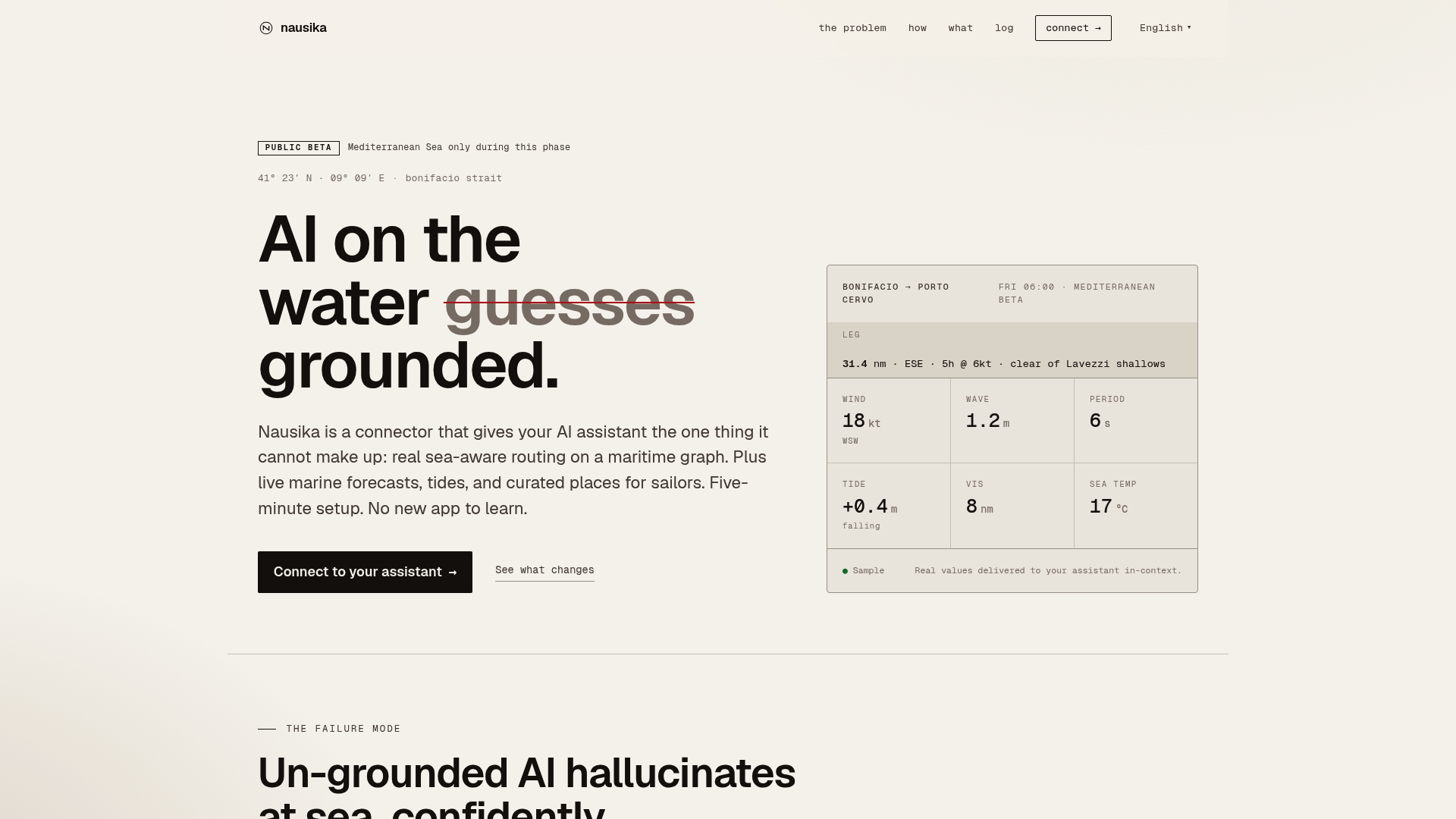
For sailors, charter operators, and marine professionals who rely on AI assistants for passage planning, Nausika replaces the risk of hallucinated coordinates and outdated chart data with sourced, structured results the assistant can reason over confidently. The connector follows the governance pattern described throughout this article: scoped read access, typed schemas, and audit logging for every query.
Nausika is currently in public beta, with free access and a clear product roadmap for metered pricing as usage scales. If you are building or evaluating a maritime AI assistant integration, check the roadmap and join the beta to see what validated domain data actually changes about the assistant’s reliability.
Authoritative sources and further reading
- Merge - Connective infrastructure for production AI
- Prizm — The MCP Layer for AI Agents
- Zapier: Build and Govern AI Workflows, Agents, and Apps
- Home Assistant API for Large Language Models | Home Assistant Developer Docs
- AI Agent HA — GitHub
- Integrate.dev
- AI Assistants: What They Are & How They Help Businesses
- Nausika · real maritime data for your AI assistant — sailing, routing, forecasts